
Parameterizing arguments#
New in version 0.10.8: JupySQL uses Jinja templates for enabling parametrization of arguments. Arguments are parametrized with {{variable}}.
Parametrization via {{variable}}#
JupySQL supports variable expansion of arguments in the form of {{variable}}. This allows the user to specify arguments with placeholders that can be replaced by variables dynamically.
The benefits of using parametrized arguments is that they can be reused for different purposes.
Let’s load some data and connect to the in-memory DuckDB instance:
%load_ext sql
%sql duckdb://
%config SqlMagic.displaylimit = 3
[JupySQL] Initializing providers...
[JupySQL] JUPYSQL_CNPG_ENABLED=NOT SET
[JupySQL] JUPYSQL_CNPG_NAMESPACE=NOT SET
[CNPG] Provider __init__ called, enabled=False
[JupySQL] CNPG provider registered, enabled=True
[JupySQL] CNPG discovered 0 database(s)
Connecting to 'duckdb://'
filename = "penguins.csv"
from pathlib import Path
from urllib.request import urlretrieve

if not Path("penguins.csv").is_file():
    urlretrieve(
        "https://raw.githubusercontent.com/mwaskom/seaborn-data/master/penguins.csv",
        filename,
    )
Now let’s create a snippet from the data by declaring a table variable and use it in the --save argument.
Create a snippet#
table = "penguins_data"
%%sql --save {{table}}
SELECT *
FROM penguins.csv
Running query in 'duckdb://'
| species | island | bill_length_mm | bill_depth_mm | flipper_length_mm | body_mass_g | sex |
|---|---|---|---|---|---|---|
| Adelie | Torgersen | 39.1 | 18.7 | 181 | 3750 | MALE |
| Adelie | Torgersen | 39.5 | 17.4 | 186 | 3800 | FEMALE |
| Adelie | Torgersen | 40.3 | 18.0 | 195 | 3250 | FEMALE |
snippet = %sqlcmd snippets {{table}}
print(snippet)
SELECT *
FROM penguins.csv
Plot a histogram#
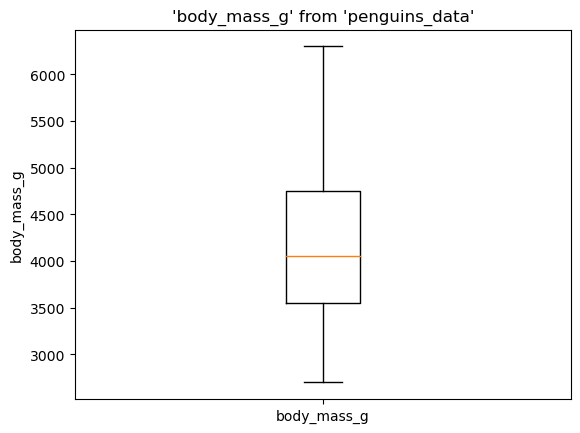
Now, let’s declare a variable column and plot a histogram on the data.
column = "body_mass_g"
%sqlplot boxplot --table {{table}} --column {{column}}
<Axes: title={'center': "'body_mass_g' from 'penguins_data'"}, ylabel='body_mass_g'>
Profile and Explore#
We can use the filename variable to profile and explore the data as well:
%sqlcmd profile --table {{filename}}
| species | island | bill_length_mm | bill_depth_mm | flipper_length_mm | body_mass_g | sex | |
|---|---|---|---|---|---|---|---|
| count | 344 | 344 | 342 | 342 | 342 | 342 | 333 |
| unique | 3 | 3 | 164 | 80 | 55 | 94 | 2 |
| top | Adelie | Biscoe | nan | nan | nan | nan | MALE |
| freq | 152 | 168 | nan | nan | nan | nan | 168 |
| mean | nan | nan | 43.9219 | 17.1512 | 200.9152 | 4201.7544 | nan |
| std | nan | nan | 5.4516 | 1.9719 | 14.0411 | 800.7812 | nan |
| min | nan | nan | 32.1 | 13.1 | 172 | 2700 | nan |
| 25% | nan | nan | 39.2000 | 15.6000 | 190.0000 | 3550.0000 | nan |
| 50% | nan | nan | 44.4000 | 17.3000 | 197.0000 | 4050.0000 | nan |
| 75% | nan | nan | 48.5000 | 18.7000 | 213.0000 | 4750.0000 | nan |
| max | nan | nan | 59.6 | 21.5 | 231 | 6300 | nan |
%sqlcmd explore --table {{filename}}
Run some tests#
%sqlcmd test --table {{table}} --column {{column}} --greater 3500
True